Merchant refers to the Store entity in our data structure. For the purpose of this use case, we will be using the term Merchant as it's more likely to apply to users of this feature.
Standalone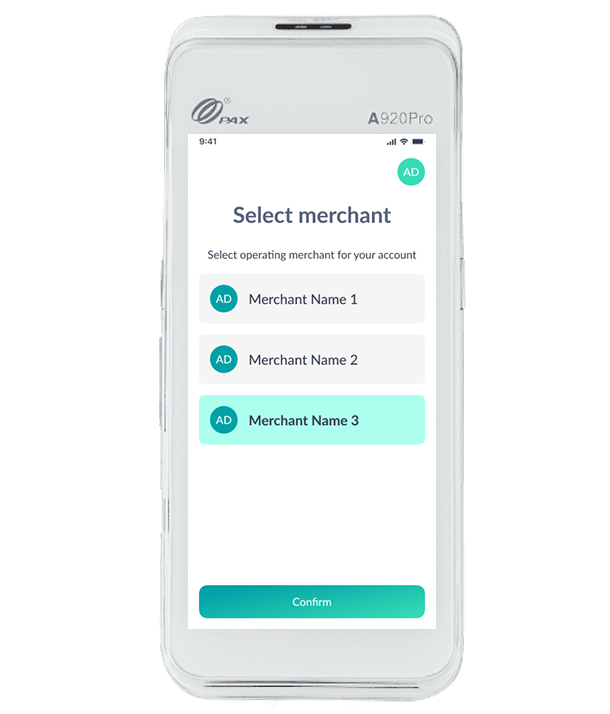
In a standalone use case, the payment terminal (POI) runs a dedicated payment application separate from the Point of Sale (POS) system.
The core mechanism relies on manual, local selection by the user:
Process: A dedicated menu, top right corner, within the payment application allows the user to view a list of registered merchants and to change the merchant. Merchant selection is not requested for each transaction.
Settlement: All subsequent transactions processed by the terminal are automatically associated with the currently selected merchant account for settlement, until the cashier returns to the menu and selects a different merchant.
POS Integration
Refer to the dedicated article in the Advanced POS Integration.
Core Functional Aspects
Merchant Selection & Association
Merchant refers to the Store entity in our data structure. For the purpose of this use case, we will be using the term "Merchant" as it's more likely to apply to users of this feature.
On Spring : A single terminal is capable of being mapped to multiple merchants.
On the terminal : Prior to processing a transaction, the user can select the desired merchant from the list mapped to the terminal.
Settlement Association: All financial transactions, upon settlement, are strictly associated with the selected merchant.
Company Flexibility: The system supports the selection of two or more stores that belong to different parent companies.
Reporting & History
Transaction History : The application displays the complete transaction history relevant only to the currently selected store.
Transaction Reports : The application displays a consolidated transaction report specific to the currently selected merchant.
Reconciliation & Printing
Manual Reconciliation: When reconciliation is triggered manually, the reconciliation report is generated, sent, and printed only for the selected store. (Note: This feature requires thorough testing.)
Automatic Reconciliation: When reconciliation is triggered automatically (e.g., end-of-day process), the report is generated, sent, and printed for all stores mapped to the terminal.
User Interface
Company Branding: The application interface displays the company logo associated with the currently selected store.
Merchant Configuration Consistency
-
All merchants/stores mapped to the same terminal must share identical key configurations.
Examples: Supported payment schemes, transaction reference formats, handling of tips, DCC (Dynamic Currency Conversion) settings, etc.